Skip to content
Syndell
  • Services
    • Custom Application Development
    • MVP Development
    • Web Development
    • Mobile App Development
    • Full Stack Development
    • Front-end Development
    • Back-end Development
    • Cross-Platform App Development
    • Application Modernization
    • Application Management
    • Application Maintenance
    • Application Integration
    • Custom Software Development
    • Startup Solutions
    • On-demand Solutions
    • Software Consulting
    • ERP Software development
    • AR/VR Development
    • IoT Development
    • Microservices
    • Software Product Development
    • Software Development Outsourcing
    • Offshore Software Development
    • Data Science
    • Data Warehouse
    • Data Migration
    • Data Cleansing
    • Data Visualization
    • Data Collection
    • Data Integration
    • Big Data
    • Business Intelligence
    Artificial Intelligence
    • AI Consulting
    • Generative AI Development
    • Computer Vision Development
    • AI And ML Services
    • LLM Development
    • Adaptive AI
    • Robotic Process Automation
    • Natural Language Processing
    • Workflow Automation
    • Chatbot Development
    Machine Learning
    • ML Consulting
    • Deep Learning
    • TensorFlow Development
    • Cloud Services
    • Cloud Migration
    • Cloud Consulting
    • Cloud Integration
    • Cloud Support and Maintenance
    • Cloud Managed Services
    • Devops Consulting
    • DevOps Implementation
    • Devops Containerization
    • DevSecops Services
    • DevOps Automation
    • IT Consulting
    • It Staff Augmentation
    • It Outsourcing
    • Saas Application Development
    • Saas Consulting
    • SaaS Architecture
    • AI Marketing
    • SEO Services
    • Guest Posting Services
    Get Future-Ready To
    Explore Robust Digital
    Solutions!
    Lock in a Consultation
  • Technologies
    Frontend
    • Angular JS Development
    • React JS Development
    • Vue JS Development
    • Next JS Development
    Cloud
    • AWS Development
    • Google Cloud Development
    • Azure Development
    Mobile
    • iOS Development
    • Android App Development
    • React Native Development
    • Flutter Development
    Data Analytics
    • Power BI
    • Tableau
    eCommerce & CMS
    • WordPress Development
    • Shopify Development
    • Webflow Development
    • WooCommerce Development
    Database
    • MySQL
    • MongoDB
    • DynamoDB
    • Firebase
    Backend
    • Node JS Development
    • Laravel Development
    Elevate Your Business with Next-Gen Tech!
    Technologies Menu CTA - 2
    Start Your Journey
  • Hire
    Frontend Developers
    • Hire Angular JS Developers
    • Hire React JS Developers
    • Hire Vue JS Developers
    • Hire Next.JS Developers
    Software Developers
    • Hire Full Stack Developers
    • Hire MEAN Stack Developers
    • Hire MERN Stack Developers
    • Hire SaaS Developers
    • Hire Offshore Developers
    Backend Developers
    • Hire Node JS Developers
    • Hire Laravel Developers
    eCommerce & CMS
    • Hire WordPress Developers
    • Hire Shopify Developers
    • Hire Webflow Developers
    Data Science
    • Hire Tableau Consultant
    • Hire Data Analyst
    • Hire Data Scientist
    • Hire Data Engineer
    • Hire Qlik Developers
    Mobile App Developers
    • Hire Flutter Developers
    • Hire React Native Developers
    • Hire iOS Developers
    • Hire Android Developers
    Automation
    • Hire RPA Developers
    • Hire UiPath Developers
    • Hire Automation Anywhere Developers
    • Hire Power Automate Developers
    DevOps
    • Hire DevOps Engineers
    AI/ML
    • Hire AI ML Developers
    • Hire ChatGPT Developers
    • Hire Alexa Skill Developers
    • Hire OpenAI Developers
    • Hire Pytorch Developers
    • Hire Prompt Engineers
    • Hire Neural Network Developers
    Cloud
    • Hire Cloud Developers
    • Hire AWS Developers
    • Hire Azure Developers
    Shape Triumph with Developers Dedicated to Excellence!
    Technologies Menu CTA - 2
    Book An Appointment
  • Industries
    Business
    Sports
    Healthcare
    Restaurant
    Real Estate
    Fintech
    Education
    Logistics
    Travel
    Ecommerce
    Entertainment
    Social Networking
    Have Any Other
    Industry In Mind?
    Tell Us
  • Case Studies
  • Company
    • About Us
    • Infrastructure
    • Life At Syndell
    • Leadership Team
    • Client Testimonials
    • Careers
    • Areas We Serve
    • Blog
    Company Menu CTA-2

    Corporate Profile

    Empower Your Business Through Digital Transformation
    Download PDF!

    Phone No.

    +1-858-275-3535,

    +1-214-600-2592

    Email Address

    hello@reference.syndelltech.com

    Skype

    hiren.k.sanghvi

    Watch Video

  • Contact Us
GET A QUOTE
Syndell
  • Services
    Application Development
    • Custom Application Development
    • MVP Development
    • Web Development
    • Mobile App Development
    • Full Stack Development
    • Front-end Development
    • Back-end Development
    • Cross-Platform App Development
    • Application Modernization
    • Application Management
    • Application Maintenance
    • Application Integration
    Software Engineering
    • Custom Software Development
    • Startup Solutions
    • On-demand Solutions
    • Software Consulting
    • ERP Software development
    • AR/VR Development
    • IoT Development
    • Microservices
    • Software Product Development
    • Software Development Outsourcing
    • Offshore Software Development
    Data Engineering
    • Data Science
    • Data Warehouse
    • Data Migration
    • Data Cleansing
    • Data Visualization
    • Data Collection
    • Data Integration
    • Big Data
    • Business Intelligence
    AI/ML
    Artificial Intelligence
    • AI Consulting
    • Generative AI Development
    • Computer Vision Development
    • AI And ML Services
    • LLM Development
    • Adaptive AI
    • Robotic Process Automation
    • Natural Language Processing
    • Workflow Automation
    • Chatbot Development
    Machine Learning
    • ML Consulting
    • Deep Learning
    • TensorFlow Development
    Cloud
    • Cloud Services
    • Cloud Migration
    • Cloud Consulting
    • Cloud Integration
    • Cloud Support and Maintenance
    • Cloud Managed Services
    DevOps
    • Devops Consulting
    • DevOps Implementation
    • Devops Containerization
    • DevSecops Services
    • DevOps Automation
    IT Services
    • IT Consulting
    • It Staff Augmentation
    • It Outsourcing
    Saas
    • Saas Application Development
    • Saas Consulting
    • SaaS Architecture
    Digital Marketing
    • AI Marketing
    • SEO Services
    • Guest Posting Services
    Get Future-Ready To
    Explore Robust Digital
    Solutions!
    Lock in a Consultation
  • Technologies
    Frontend
    • Angular JS Development
    • React JS Development
    • Vue JS Development
    • Next JS Development
    Backend
    • Node JS Development
    • Laravel Development
    Mobile
    • iOS Development
    • Android App Development
    • React Native Development
    • Flutter Development
    eCommerce & CMS
    • WordPress Development
    • Shopify Development
    • Webflow Development
    • WooCommerce Development
    Data Analytics
    • Power BI
    • Tableau
    Cloud
    • AWS Development
    • Google Cloud Development
    • Azure Development
    Database
    • MySQL
    • MongoDB
    • DynamoDB
    • Firebase
    Elevate Your Business with Next-Gen Tech!
    Start Your Journey
  • Hire
    Frontend Developers
    • Hire Angular JS Developers
    • Hire React JS Developers
    • Hire Vue JS Developers
    • Hire Next.JS Developers
    Backend Developers
    • Hire Node JS Developers
    • Hire Laravel Developers
    Mobile App Developers
    • Hire Flutter Developers
    • Hire React Native Developers
    • Hire iOS Developers
    • Hire Android Developers
    eCommerce & CMS
    • Hire WordPress Developers
    • Hire Shopify Developers
    • Hire Webflow Developers
    AI/ML
    • Hire AI ML Developers
    • Hire ChatGPT Developers
    • Hire Alexa Skill Developers
    • Hire OpenAI Developers
    • Hire Pytorch Developers
    • Hire Prompt Engineers
    • Hire Neural Network Developers
    Software Developers
    • Hire Full Stack Developers
    • Hire MEAN Stack Developers
    • Hire MERN Stack Developers
    • Hire Saas Developers
    • Hire Offshore Developers
    Automation
    • Hire RPA Developers
    • Hire UiPath Developers
    • Hire Automation Anywhere Developers
    • Hire Power Automate Developers
    Data Science
    • Hire Tableau Consultant
    • Hire Data Analyst
    • Hire Data Scientist
    • Hire Data Engineer
    • Hire Qlik Developers
    Cloud
    • Hire Cloud Developers
    • Hire AWS Developers
    • Hire Azure Developers
    DevOps
    • Hire DevOps Engineers
    Shape Triumph with Developers Dedicated to Excellence!
    Book An Appointment
  • Industries
    • Business
    • Sports
    • Healthcare
    • Restaurant
    • Real Estate
    • Fintech
    • Education
    • Logistics
    • Travel
    • Ecommerce
    • Entertainment
    • Social Networking
    Have Any Other
    Industry In Mind?
    Tell Us
  • Case Studies
  • Company
    Who We Are
    • About Us
    • Infrastructure
    • Client Testimonials
    • Life at Syndell
    • Careers
    • Leadership Team
    • Areas We Serve
    Insights
    • Blog
    Company Menu CTA-2

    Corporate Profile

    Empower Your Business Through Digital Transformation
    Download PDF!

    Phone No.

    +1-858-275-3535,
    +1-214-600-2592

    Email Address

    hello@reference.syndelltech.com

    Skype

    hiren.k.sanghvi

    Watch Video
  • Contact Us
  • GET A QUOTE

Home » 8 Steps to Upload An App To Google Play Store?

  • Mobile App

8 Steps to Upload An App To Google Play Store?

  • Picture of Nirav Prajapati Nirav Prajapati
  • February 20, 2023
How to upload an app to google play store
Table of Contents

Looking

to develop a tailored
software solution?
With over 10+ years of expertise and a track record of delivering 600+ software solutions, our team transforms your concepts into reality. Let’s discuss your project.
Book an Appointment

Are you ready to take your app to the next level and introduce it to millions of Android users? Then, the Google Play Store is the perfect platform to share your creations with the world.

This blog post will take you through eight steps to help you publish Android app on Google play store. From setting up your google play developer account to the moment of publishing, we’ll cover everything you need to know to get your app in front of the right audience.

Publishing an app to Google Play Console is a big milestone for any app developer. It is an exciting moment, but it also requires a lot of preparation and attention to detail to ensure that the app is ready for launch.

To ensure that your app is successful, it is important to take the time to prepare your app for launch. Here are some of the things you should do before publishing your app to Google Play Console:

Want to make your app idea a success?

Contact us for expert assistance

Things To Do Before Publishing Your App To Google Play Console

1. Test Your App Thoroughly:

Make sure your app is thoroughly tested before launching it. This means testing the app on a variety of devices and operating systems. Ensure all features and functions are working correctly without significant bugs.

2. Optimize for Different Screen Sizes and Resolutions:

You should ensure that your app is compatible with all Android versions and looks great on all sizes of screens. This means ensuring all your graphics and text look good on different devices and resolutions.

3. Check for Any Errors in the Code:

Ensure all syntax is correct and all functions are working properly so your app runs smoothly.

4. Optimize Your App's Performance:

Ensure your app’s performance is up to par by optimizing its code to run quickly and efficiently and ensuring it is free of memory leaks or other issues that might slow it down.

5. Make Sure Your App is Secure:

Ensure your app’s code is secure and can’t be compromised before releasing it.

6. Add Screenshots and Videos:

Your app’s page on the Google Play Console can be enhanced by adding screenshots and videos. Ensure your screenshots and videos are high-quality and represent your app well.

7. Optimize Your App's Description:

Google Play Console descriptions should accurately describe your app and give users an idea of what it’s about. Ensure you add relevant keywords and phrases, so your app appears in relevant searches.

8. Get Feedback from Beta Testers:

You should have a few people test your app before you release it to the public so that you can catch any issues or bugs you missed during your testing.

9. Make Sure Your App is Compliant with Google's Policies:

Before launching your app, ensure it complies with Google’s policies and guidelines. These policies and guidelines can be found on the Google Play Console support.

Once your app meets the requirements, you can move forward and follow the steps to publish your app successfully.

Interested in creating your own Android app?

Hire Our Mobile Developers

How To Publish App On Play Store Step By-Step?

Step 1: Create an Account as a Developer
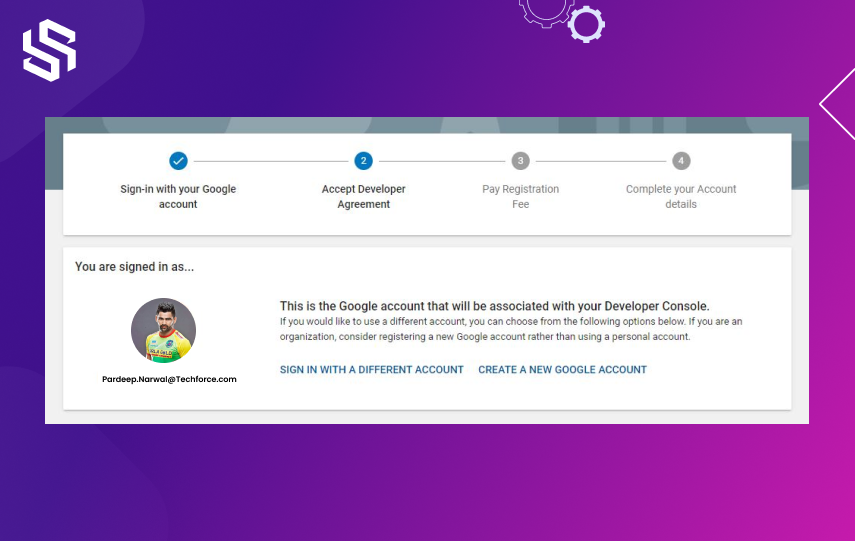
Create an Account as a Developer
  • Go to the Google Play Developer Console and create a new account. You will need to have a Google account to sign up.
  • Fill in the required information and pay a one-time registration fee of $25 to become a verified developer.

Step 2: Make a Google Wallet Merchant and connect it to your Developer Account.
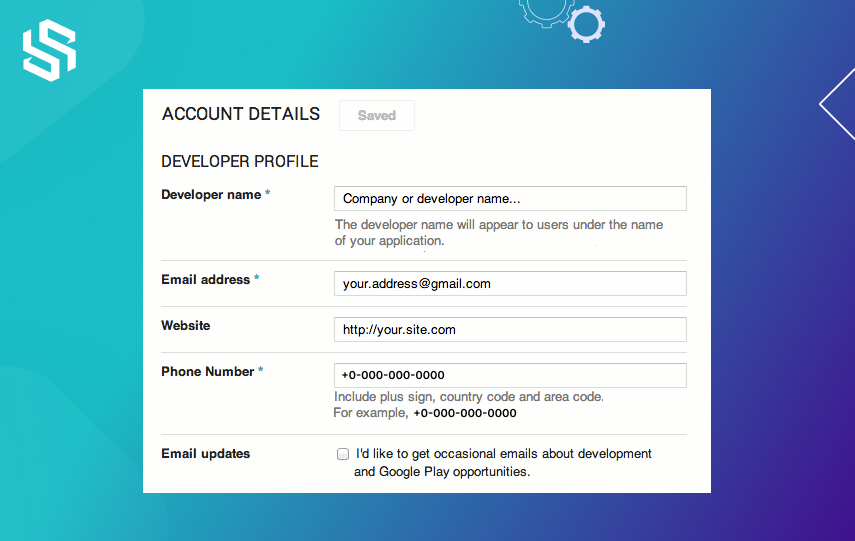
Make a Google Wallet Merchant and connect it to your Developer Account.
  • Go to Google Payment Center and create a new merchant account.
  • Connect your merchant account to your developer account by going to the Payment settings in the Google Play Developer Console.

Step 3: Upload an App to the Google Play Store

  • In the Google Play Developer Console, click on the “Create Application” button and select the default language for your app.
  • Fill in the required information, including your app’s title, description, and screenshots.
  • Select the appropriate category and upload the APK file of your app.

Step 4: Install the Android Package Kit
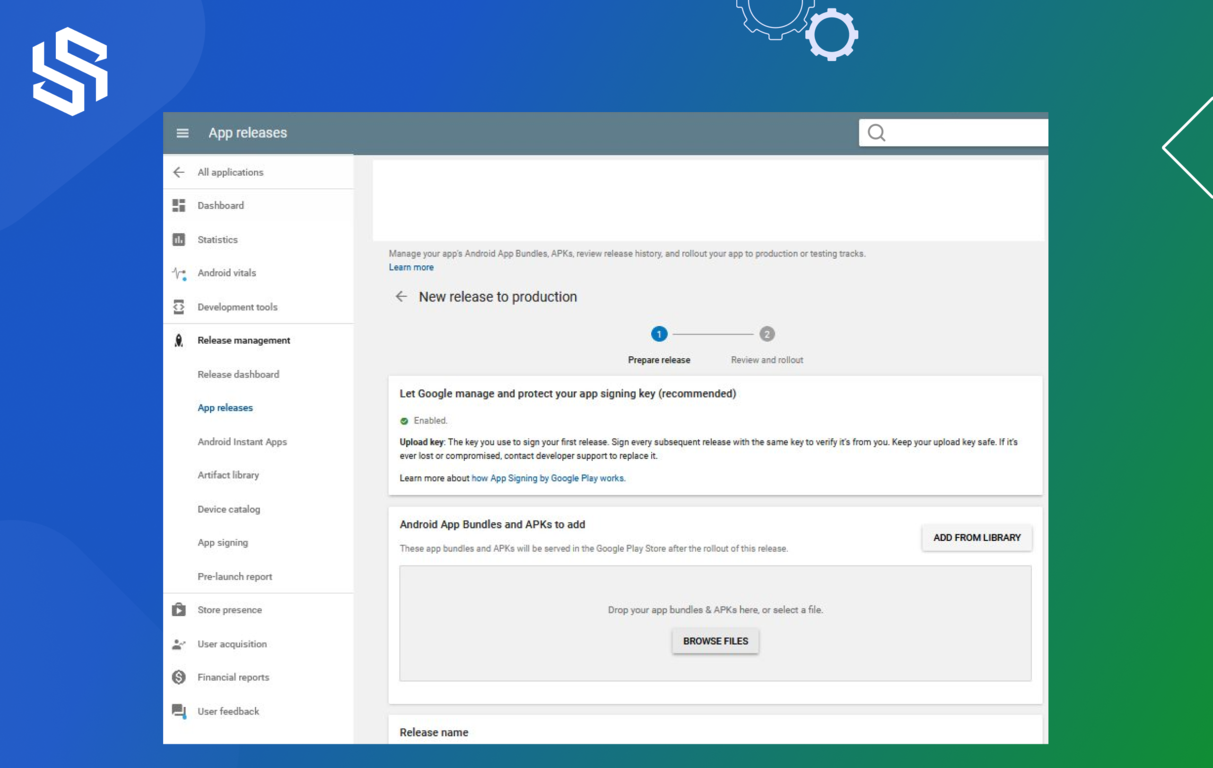
Install the Android Package Kit
  • Download and install the Android Package Kit (APK) on your computer. Signing and uploading your app to the Google Play Store is necessary.

Step 5: Make a store listing
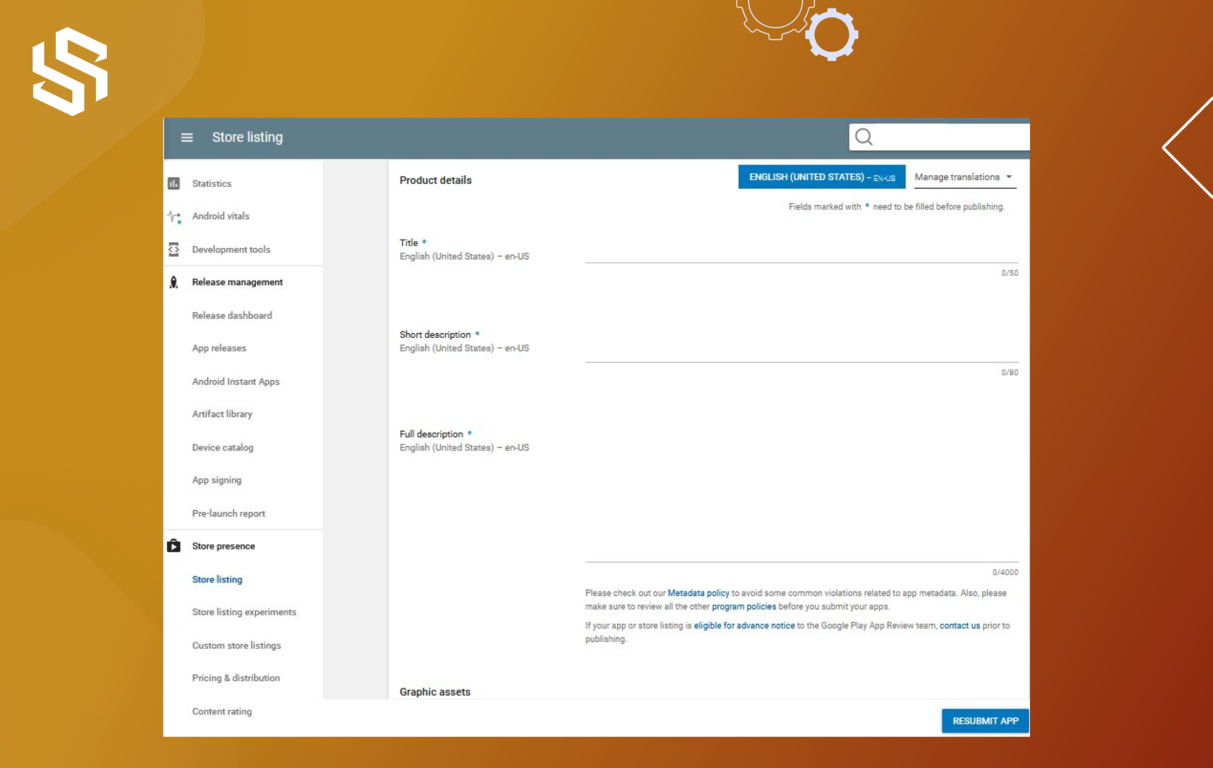
Make a store listing
  • Create a store listing for your app by filling in the required information, including the title, description, screenshots, and promotional video (if applicable).
  • Make sure to provide accurate and detailed information about your app to attract potential users.

Step 6: Include a Content Rating
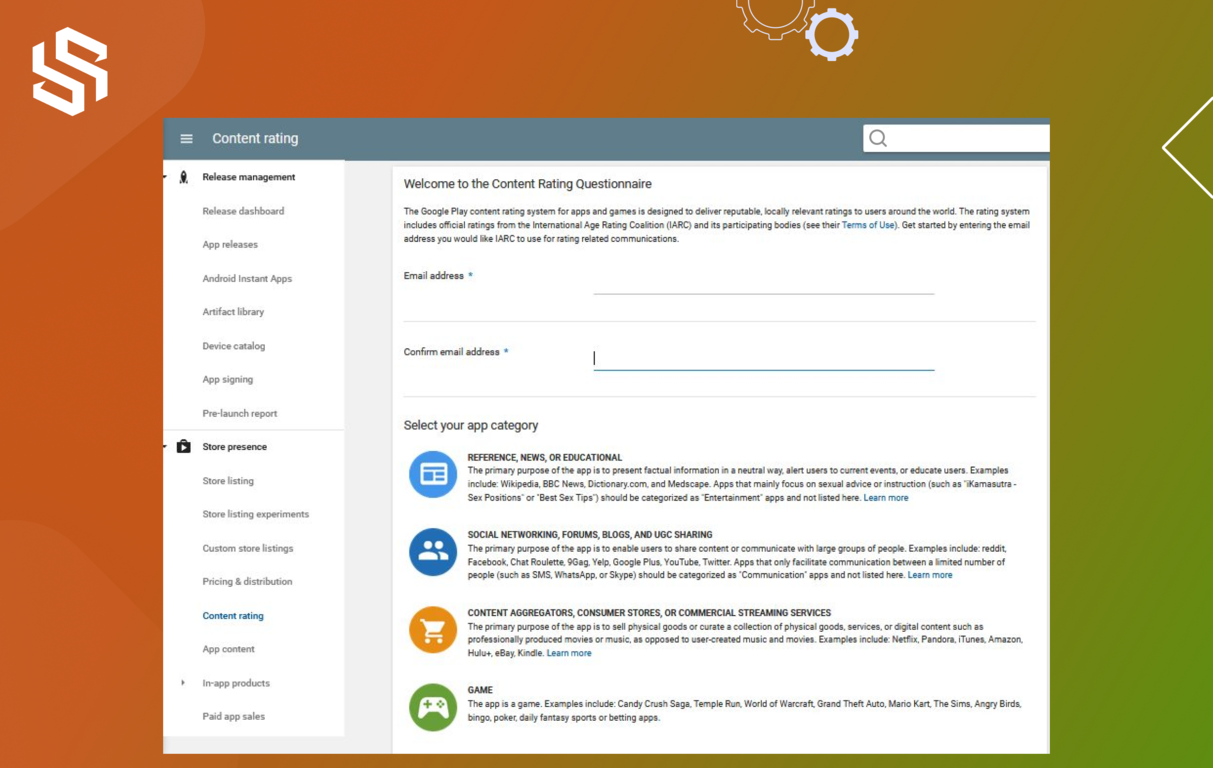
Include a Content Rating
  • Go to the Content Rating section in the Google Play Developer Console and complete the questionnaire to determine the appropriate rating for your app.
  • This will help users understand the content and age appropriateness of your app.

Step 7: Select a Pricing and Distribution Model
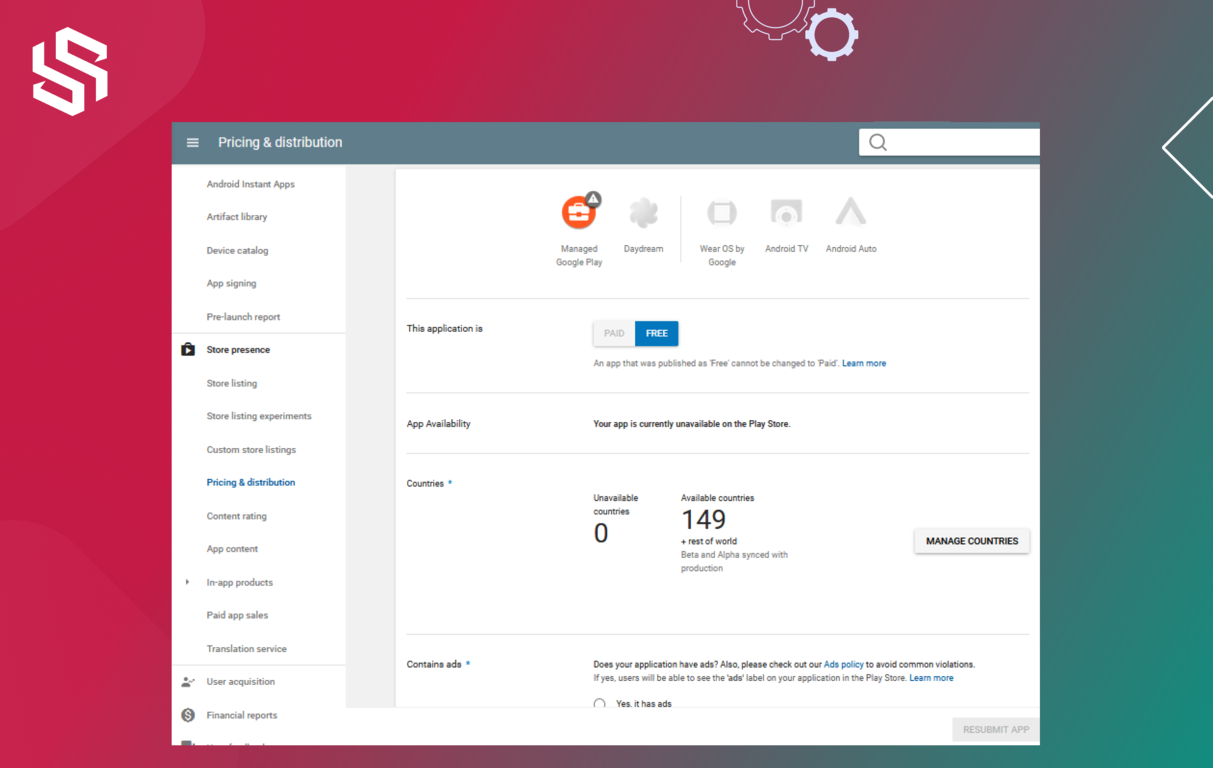
Select a Pricing and Distribution Model
  • In the Pricing and Distribution section of the Google Play Developer Console, select a pricing model for your app (free or paid) and choose which country and region to distribute your app.

Step 8: Publish Your Application
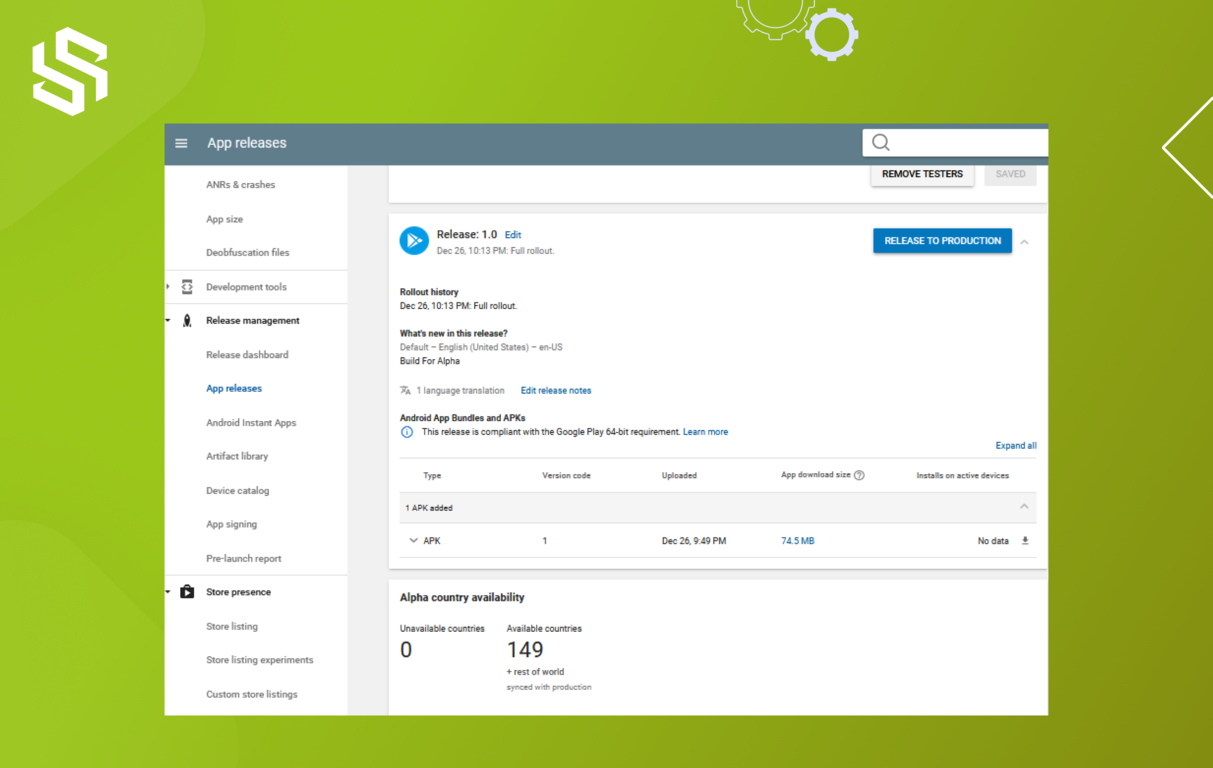
Publish Your Application
  • Once all the required information is filled in, and your app is ready for publishing, click the “Publish” button in the Google Play Developer Console.
  • Your app will be reviewed by Google for compliance with its policies before it is made available on the Google Play Store.
  • Once your app is live, you can monitor its performance and make updates as needed.

After submitting your app to the Google Play Store, the work doesn’t stop there. To ensure your app’s success, it’s important to continue to monitor and optimize it even after it’s been published.

By following the below tips, you can ensure that your app continues to perform well on the Google Play Store and attract and retain a large user base.

Want to create an Android app but not sure how? We can guide you through the process.

Contact us

Things To Do After Play Store App Submission

1. Monitor App Reviews and Ratings

Now that your app is live, it is important to stay on top of app reviews and ratings. By monitoring your reviews, you can quickly identify and address any issues users may be having and improve your app based on user feedback.

2. Keep Your App Updated

It is important to keep your app updated with the latest features and bug fixes. Doing so will ensure that your users have a positive experience and are more likely to recommend your app to others.

3. Optimize Your App’s Listing

Optimizing your app’s listing on the Play Store will help you gain more visibility and increase the chances of your app being discovered by potential users. Ensure you include a compelling description, attractive screenshots and videos, and relevant keywords to optimize your listing.

4. Promote Your App

Promoting your app is a great way to increase app downloads and reach a wider audience. You can promote your app through various channels, such as social media, email marketing, influencer marketing, and more.

5. Track App Performance

It is important to track your app’s performance to identify any issues affecting user engagement or retention. You can use analytics tools such as Google Analytics to measure page views, session times, and user engagement.

6. Engage with Your Users

Engaging with your users is a great way to build relationships and encourage user loyalty. Responding to user feedback on the Play Store, social media channels, and email can help you build a strong connection with your users.

7. Monitor Your App’s Ranking

Monitoring your app’s ranking in the Play Store can help you identify any changes in user engagement and take steps to improve your app’s performance.

8. Monitor the Competition:

Staying up-to-date on your competition is important to stay ahead in the market. Monitoring your competitors can help you identify any opportunities for improvement and take steps to stay ahead of the competition.

9. Analyze User Data

Analyzing user data can help you gain valuable insights into user behavior and make informed decisions about optimizing your app for maximum success. You can use analytics tools such as Google Analytics to analyze user data and gain valuable insights.

Ready to Get Started with Android App Development Service to get it published on the Google Play Store for a Bright Future?

Get a Quote for Your App

Conclusion

Overall, the process of uploading an app to the Google Play Store is not overly difficult if you follow the 8 steps outlined above. From checking the requirements and registering a developer account to testing the app, filling out the details, and setting up a release, this guide has provided a comprehensive overview of the process. With a bit of time and effort, you can get your app up and running on the Google Play Store quickly.

So, an app’s success demands constant efforts to be ahead of the curve. Get in touch with us to learn more about creating an app or marketing. We are an app development company offering the best app solutions with the best developers to hire for businesses globally.

FAQs

How long does it take for my app to be approved on the Google Play Store?

The time it takes for an app to be approved on the Google Play Store can vary, but on average it takes about 2-3 days for an app to be reviewed. However, it can take longer if the app requires additional review or if there are issues with the app that need to be addressed before it can be approved.

Do I need a specific type of Google account to become a developer on the Google Play Store?

No, you do not need a specific type of Google account to become a developer on the Google Play Store. All you need is a Google account, which can be created for free. Once you have created your Google account, you can register as a developer on the Google Play Store and submit your apps.

Is there a limit to how many apps I can publish on the Google Play Store?

The Google Play Store has no limit to the number of apps a developer can publish as long as each app follows the store’s policies and guidelines.

Can I update my app after it has been published on the Google Play Store?

Yes, you can update your app after it has been published on the Google Play Store. Updating your app allows you to fix bugs, add new features, and improve the overall user experience.

Can I change the price of my app after it has been published on the Google Play Store?

Yes, you can change your app from Paid to Free of charge. However, once your app has been offered free of charge, the app cannot be changed back to Paid. If you would like to offer a Paid version of your app, you need to create a new app with a new package name and set a price. This way, you can keep the free version available for your customers while offering a paid version for those willing to pay.

Can I make my app available in certain countries only on the Google Play Store?

Yes, you can make your app available in certain countries only on the Google Play Store. When you submit your app to the Play Store, you can select the countries where your app should be available. You can add or remove countries later by updating your app’s availability in the Play Store.

How do I monitor the performance of my app on the Google Play Store?

To monitor your app’s performance on the Google Play Store, you can use the Google Play Console. The Play Console includes various features that will help you track your app’s performance, such as crash reports, user reviews, and active user metrics. Additionally, you can use Google Play’s Pre-Launch Reports to test your app and monitor its performance in real time. Finally, you can also set up an A/B test to evaluate the performance of different app versions.

What happens if my app is rejected by Google during the review process?

If Google rejects your app during the review process, you will receive an email with a link to the detailed review report. The report will include the reasons for rejection and any steps you need to take to resolve the issue and resubmit your app. Depending on the severity of the issue, you may need to make significant changes to your app before it can be approved.

Get in Touch
Picture of Nirav Prajapati

Nirav Prajapati

Nirav Prajapati is a professional Flutter Development expert in Syndell with extensive experience in developing mobile applications. With his expertise, he has delivered high-quality and reliable mobile applications that have been highly successful. He is a trusted partner, who can bring your app ideas to life.

Our Blogs

All Posts
Future of AI Environmental Services 

The Future of AI in Environmental Services: What to Expect by 2030

June 2, 2025
Read More
Future of the Automotive Industry in 2025

How AI Is Driving the Future of the Automotive Industry in 2025

May 26, 2025
Read More
AI in Water Management

AI in Water Management: Efficiency, Accuracy, and Sustainability

May 19, 2025
Read More
Take A Step Towards
Your Dream Business
Contact No :

+1-858-275-3535,
+1-214-600-2592

Email Address :
hello@reference.syndelltech.com
Teams :
hiren.k.sanghvi
Let's Make Your Project Happen
Google logo

4.9

Rating Stars
Clutch Logo

5.0

5.0 Rating Star
GoodFirms Logo

5.0

5.0 Rating Star
Follow us
Let's Discuss Your Business!
Book a Call
Hire Developers
Dedicated Developers
  • Hire Full Stack Developers
  • Hire Data Scientists
  • Hire AI ML Developers
  • Hire ChatGPT Developers
  • Hire OpenAI Developers
  • Hire RPA Developers
  • Hire Shopify Developers
  • Hire Neural Networks Developer
  • Hire UiPath Developers
  • Hire Full Stack Developers
  • Hire Data Scientists
  • Hire AI ML Developers
  • Hire ChatGPT Developers
  • Hire OpenAI Developers
  • Hire RPA Developers
  • Hire Shopify Developers
  • Hire Neural Networks Developer
  • Hire UiPath Developers
Services
  • MVP Development
  • Web Development
  • Mobile Development
  • Startup Solutions
  • SaaS App Development
  • Full Stack Development
  • AI ML Development
  • WordPress Development
  • SEO Services
  • MVP Development
  • Web Development
  • Mobile Development
  • Startup Solutions
  • SaaS App Development
  • Full Stack Development
  • AI ML Development
  • WordPress Development
  • SEO Services
Industries
  • Business
  • Real Estate
  • Travel
  • Sports
  • Fintech
  • Ecommerce
  • Healthcare
  • Education
  • Restaurant
  • Business
  • Real Estate
  • Travel
  • Sports
  • Fintech
  • Ecommerce
  • Healthcare
  • Education
  • Restaurant
Portfolio
  • Fantasy Sports App
  • Clothing Web App
  • Fleet Management Software
  • Bar Interior Design Web App
  • Property Management Software
  • Entertainment Web App
  • Language Learning App
  • Educational Web Application
  • Textile Manufacturing Web App
  • Fantasy Sports App
  • Clothing Web App
  • Fleet Management Software
  • Bar Interior Design Web App
  • Property Management Software
  • Entertainment Web App
  • Language Learning App
  • Educational Web Application
  • Textile Manufacturing Web App
Quick Links
  • Industries
  • Areas We Serve
  • Case Studies
  • Client Testimonials
  • Contact Us
  • Get An Estimate
  • Blog
  • Careers
  • Industries
  • Areas We Serve
  • Case Studies
  • Client Testimonials
  • Contact Us
  • Get An Estimate
  • Blog
  • Careers
Syndell

A Full Stack App Development Agency.

Certified USA
ISO Certified
US - United States
  • USA

600 North Broad Street, Suite 5 #3424, Middletown, DE – 19709

IN - India
  • INDIA

304 Shikhar Complex, Srimali Society, Navrangpura, Ahmedabad – 380009

United Kingdom
  • UK

Bloc, 17 Marble St, Manchester, M2 3AW, United Kingdom

©Syndell 2014-2026. All rights reserved.
DMCA.com Protection Status
Protected by Copyscape
Terms of Use | Privacy Policy | Sitemap