Skip to content
Syndell
  • Services
    • Custom Application Development
    • MVP Development
    • Web Development
    • Mobile App Development
    • Full Stack Development
    • Front-end Development
    • Back-end Development
    • Cross-Platform App Development
    • Application Modernization
    • Application Management
    • Application Maintenance
    • Application Integration
    • Custom Software Development
    • Startup Solutions
    • On-demand Solutions
    • Software Consulting
    • ERP Software development
    • AR/VR Development
    • IoT Development
    • Microservices
    • Software Product Development
    • Software Development Outsourcing
    • Offshore Software Development
    • Data Science
    • Data Warehouse
    • Data Migration
    • Data Cleansing
    • Data Visualization
    • Data Collection
    • Data Integration
    • Big Data
    • Business Intelligence
    Artificial Intelligence
    • AI Consulting
    • Generative AI Development
    • Computer Vision Development
    • AI And ML Services
    • LLM Development
    • Adaptive AI
    • Robotic Process Automation
    • Natural Language Processing
    • Workflow Automation
    • Chatbot Development
    Machine Learning
    • ML Consulting
    • Deep Learning
    • TensorFlow Development
    • Cloud Services
    • Cloud Migration
    • Cloud Consulting
    • Cloud Integration
    • Cloud Support and Maintenance
    • Cloud Managed Services
    • Devops Consulting
    • DevOps Implementation
    • Devops Containerization
    • DevSecops Services
    • DevOps Automation
    • IT Consulting
    • It Staff Augmentation
    • It Outsourcing
    • Saas Application Development
    • Saas Consulting
    • SaaS Architecture
    • AI Marketing
    • SEO Services
    • Guest Posting Services
    Get Future-Ready To
    Explore Robust Digital
    Solutions!
    Lock in a Consultation
  • Technologies
    Frontend
    • Angular JS Development
    • React JS Development
    • Vue JS Development
    • Next JS Development
    Cloud
    • AWS Development
    • Google Cloud Development
    • Azure Development
    Mobile
    • iOS Development
    • Android App Development
    • React Native Development
    • Flutter Development
    Data Analytics
    • Power BI
    • Tableau
    eCommerce & CMS
    • WordPress Development
    • Shopify Development
    • Webflow Development
    • WooCommerce Development
    Database
    • MySQL
    • MongoDB
    • DynamoDB
    • Firebase
    Backend
    • Node JS Development
    • Laravel Development
    Elevate Your Business with Next-Gen Tech!
    Technologies Menu CTA - 2
    Start Your Journey
  • Hire
    Frontend Developers
    • Hire Angular JS Developers
    • Hire React JS Developers
    • Hire Vue JS Developers
    • Hire Next.JS Developers
    Software Developers
    • Hire Full Stack Developers
    • Hire MEAN Stack Developers
    • Hire MERN Stack Developers
    • Hire SaaS Developers
    • Hire Offshore Developers
    Backend Developers
    • Hire Node JS Developers
    • Hire Laravel Developers
    eCommerce & CMS
    • Hire WordPress Developers
    • Hire Shopify Developers
    • Hire Webflow Developers
    Data Science
    • Hire Tableau Consultant
    • Hire Data Analyst
    • Hire Data Scientist
    • Hire Data Engineer
    • Hire Qlik Developers
    Mobile App Developers
    • Hire Flutter Developers
    • Hire React Native Developers
    • Hire iOS Developers
    • Hire Android Developers
    Automation
    • Hire RPA Developers
    • Hire UiPath Developers
    • Hire Automation Anywhere Developers
    • Hire Power Automate Developers
    DevOps
    • Hire DevOps Engineers
    AI/ML
    • Hire AI ML Developers
    • Hire ChatGPT Developers
    • Hire Alexa Skill Developers
    • Hire OpenAI Developers
    • Hire Pytorch Developers
    • Hire Prompt Engineers
    • Hire Neural Network Developers
    Cloud
    • Hire Cloud Developers
    • Hire AWS Developers
    • Hire Azure Developers
    Shape Triumph with Developers Dedicated to Excellence!
    Technologies Menu CTA - 2
    Book An Appointment
  • Industries
    Business
    Sports
    Healthcare
    Restaurant
    Real Estate
    Fintech
    Education
    Logistics
    Travel
    Ecommerce
    Entertainment
    Social Networking
    Have Any Other
    Industry In Mind?
    Tell Us
  • Case Studies
  • Company
    • About Us
    • Infrastructure
    • Life At Syndell
    • Leadership Team
    • Client Testimonials
    • Careers
    • Areas We Serve
    • Blog
    Company Menu CTA-2

    Corporate Profile

    Empower Your Business Through Digital Transformation
    Download PDF!

    Phone No.

    +1-858-275-3535,

    +1-214-600-2592

    Email Address

    hello@reference.syndelltech.com

    Skype

    hiren.k.sanghvi

    Watch Video

  • Contact Us
GET A QUOTE
Syndell
  • Services
    Application Development
    • Custom Application Development
    • MVP Development
    • Web Development
    • Mobile App Development
    • Full Stack Development
    • Front-end Development
    • Back-end Development
    • Cross-Platform App Development
    • Application Modernization
    • Application Management
    • Application Maintenance
    • Application Integration
    Software Engineering
    • Custom Software Development
    • Startup Solutions
    • On-demand Solutions
    • Software Consulting
    • ERP Software development
    • AR/VR Development
    • IoT Development
    • Microservices
    • Software Product Development
    • Software Development Outsourcing
    • Offshore Software Development
    Data Engineering
    • Data Science
    • Data Warehouse
    • Data Migration
    • Data Cleansing
    • Data Visualization
    • Data Collection
    • Data Integration
    • Big Data
    • Business Intelligence
    AI/ML
    Artificial Intelligence
    • AI Consulting
    • Generative AI Development
    • Computer Vision Development
    • AI And ML Services
    • LLM Development
    • Adaptive AI
    • Robotic Process Automation
    • Natural Language Processing
    • Workflow Automation
    • Chatbot Development
    Machine Learning
    • ML Consulting
    • Deep Learning
    • TensorFlow Development
    Cloud
    • Cloud Services
    • Cloud Migration
    • Cloud Consulting
    • Cloud Integration
    • Cloud Support and Maintenance
    • Cloud Managed Services
    DevOps
    • Devops Consulting
    • DevOps Implementation
    • Devops Containerization
    • DevSecops Services
    • DevOps Automation
    IT Services
    • IT Consulting
    • It Staff Augmentation
    • It Outsourcing
    Saas
    • Saas Application Development
    • Saas Consulting
    • SaaS Architecture
    Digital Marketing
    • AI Marketing
    • SEO Services
    • Guest Posting Services
    Get Future-Ready To
    Explore Robust Digital
    Solutions!
    Lock in a Consultation
  • Technologies
    Frontend
    • Angular JS Development
    • React JS Development
    • Vue JS Development
    • Next JS Development
    Backend
    • Node JS Development
    • Laravel Development
    Mobile
    • iOS Development
    • Android App Development
    • React Native Development
    • Flutter Development
    eCommerce & CMS
    • WordPress Development
    • Shopify Development
    • Webflow Development
    • WooCommerce Development
    Data Analytics
    • Power BI
    • Tableau
    Cloud
    • AWS Development
    • Google Cloud Development
    • Azure Development
    Database
    • MySQL
    • MongoDB
    • DynamoDB
    • Firebase
    Elevate Your Business with Next-Gen Tech!
    Start Your Journey
  • Hire
    Frontend Developers
    • Hire Angular JS Developers
    • Hire React JS Developers
    • Hire Vue JS Developers
    • Hire Next.JS Developers
    Backend Developers
    • Hire Node JS Developers
    • Hire Laravel Developers
    Mobile App Developers
    • Hire Flutter Developers
    • Hire React Native Developers
    • Hire iOS Developers
    • Hire Android Developers
    eCommerce & CMS
    • Hire WordPress Developers
    • Hire Shopify Developers
    • Hire Webflow Developers
    AI/ML
    • Hire AI ML Developers
    • Hire ChatGPT Developers
    • Hire Alexa Skill Developers
    • Hire OpenAI Developers
    • Hire Pytorch Developers
    • Hire Prompt Engineers
    • Hire Neural Network Developers
    Software Developers
    • Hire Full Stack Developers
    • Hire MEAN Stack Developers
    • Hire MERN Stack Developers
    • Hire Saas Developers
    • Hire Offshore Developers
    Automation
    • Hire RPA Developers
    • Hire UiPath Developers
    • Hire Automation Anywhere Developers
    • Hire Power Automate Developers
    Data Science
    • Hire Tableau Consultant
    • Hire Data Analyst
    • Hire Data Scientist
    • Hire Data Engineer
    • Hire Qlik Developers
    Cloud
    • Hire Cloud Developers
    • Hire AWS Developers
    • Hire Azure Developers
    DevOps
    • Hire DevOps Engineers
    Shape Triumph with Developers Dedicated to Excellence!
    Book An Appointment
  • Industries
    • Business
    • Sports
    • Healthcare
    • Restaurant
    • Real Estate
    • Fintech
    • Education
    • Logistics
    • Travel
    • Ecommerce
    • Entertainment
    • Social Networking
    Have Any Other
    Industry In Mind?
    Tell Us
  • Case Studies
  • Company
    Who We Are
    • About Us
    • Infrastructure
    • Client Testimonials
    • Life at Syndell
    • Careers
    • Leadership Team
    • Areas We Serve
    Insights
    • Blog
    Company Menu CTA-2

    Corporate Profile

    Empower Your Business Through Digital Transformation
    Download PDF!

    Phone No.

    +1-858-275-3535,
    +1-214-600-2592

    Email Address

    hello@reference.syndelltech.com

    Skype

    hiren.k.sanghvi

    Watch Video
  • Contact Us
  • GET A QUOTE

Home » Easy And Effective Ways To Customize Your WordPress Website

  • WordPress

Easy And Effective Ways To Customize Your WordPress Website

  • Picture of Poonam Darji Poonam Darji
  • August 31, 2021
Easy And Effective Ways To Customize Your WordPress Website
Table of Contents

Looking

to develop a tailored
software solution?
With over 10+ years of expertise and a track record of delivering 600+ software solutions, our team transforms your concepts into reality. Let’s discuss your project.
Book an Appointment

Are you looking for ways to make your WordPress website stand out from the rest? As a website owner, it’s important to have a unique and customized website that reflects your brand and captures the attention of your audience. Fortunately, there are many easy and effective ways to customize your WordPress website without having to hire a wordpress developer or learn complex coding skills. In this blog post, we will explore some of the best tips and tricks for customizing your WordPress website and making it truly your own. So, whether you’re a beginner or an experienced WordPress user, read on to discover how you can take your website to the next level.

A lot of your business’s success depends on its web presence. However, it’s not enough that customers can find your site’s content. To attract customers and retain their business, a part of your marketing strategy needs to be dedicated to your own website.

One of the most outstanding features of WordPress, in comparison to other platforms, is its unparalleled capacity to enable custom WordPress development for your website. You have total control over the design and customization of your website. With WordPress, almost anything is achievable, and the more you learn about it, the easier it becomes to transform the appearance and function of your website. With just a few tools, you can personalize your WordPress website with ease. This article aims to guide you towards the right direction, so you can get started with your WordPress website development journey.

Easy And Effective Ways

Options for Customizing a WordPress Theme

Before we jump into the article, let’s start making changes to your theme. But, first, it pays to understand the main options and whether they suit your situation or not.

Here’s an outline of the options available to you-

  • If you want to add functionality to your theme, just install a plugin.
  • Use the custom-make in your WordPress admin screens to customize fonts, colours, and maybe layouts, too, depending on your theme.
  • If you’re working with a page builder theme, use its features to customize the design of your site.
  • If you have installed a framework theme, use one of the available themes to customize your site and any customization options feasible on the admin screens.
  • If your theme is fixed, you’ll be comfortable doing it, editing the theme’s code directly.
  • If you want to edit the code of a third-party theme, create a child theme.
If you want to edit the code, there are numerous options available to you, from using the block editor to the customizer right through to editing the files.

WooCommerce SEO Tips to Improve Your Ranking and Boost Profits for Your eStore

Do You Need to Customize Your WordPress Theme?

In some cases, customizing your WordPress theme may not be necessary. Instead, installing a plugin can provide the desired functionality. Themes dictate the appearance and presentation of your website, while plugins offer additional features. If your modifications focus more on enhancing functionality than design, it may be worthwhile to install a plugin. These can be plugins you create yourself, those you download from the plugin directory or those you purchase.

Some examples of when you may want to opt for a plugin over theme customization include:

  • Adding widgets.
  • Register for custom post types and taxonomies.
  • Creating custom fields.
  • Incorporating additional features such as a store or SEO optimization.

Reasons Why You Should Build Your Website on WordPress

There are numerous compelling reasons to choose WordPress as the platform for your website, including:

Easy installation and setup:

With WordPress, users don’t have to start from scratch, making the process of installing and setting up a website fairly straightforward. This means that users can focus on adding content and customizing their site without worrying about technical issues. Additionally, WordPress is user-friendly and accessible to individuals of all skill levels.

Customization:

WordPress offers a wide range of customizable themes, making it easy for users to personalize their website and give it a unique look and feel. Whether you’re looking to create a blog, an online store, or a portfolio site, WordPress has a theme that can meet your needs.

Plugins:

WordPress has an extensive library of plugins that can be used to enhance the functionality of your website. From boosting your site’s SEO to adding advanced design features, there’s a plugin available for almost any need. This flexibility and versatility make WordPress a popular choice among website owners.

Large community and support:

With millions of websites built on WordPress, there’s a thriving online community of users who are happy to offer advice and support. Whether you’re looking for answers to technical questions or tips on how to improve your site, you can turn to the WordPress community for help. Additionally, WordPress is constantly updated and developed, ensuring that users have access to the latest features and improvements.

Some Ways To Customize Your WordPress Website

Pick a new theme:

The quickest way to make a dramatic change to your site is to change WordPress themes. You can switch themes instantly, and you’ll get 10,000 WordPress themes to choose from. You could easily spend days browsing and reviewing themes. The next easy way to make a huge change to your site’s design is to switch from your latest posts to a static page on the homepage.

Create a custom homepage:

You can use Elementor to design a custom homepage. In case you’re not familiar with it, Elementor is a page builder plugin, and as the ‘page builder’ part implies, you can use it to create entirely custom pages. To make a custom page, you need to add the widgets you want to the page content. After that, you can browse the pre-built homepages, insert your favourite, and then swap out the text and images for a perfect fit.

Create a custom homepage:

WordPress displays ten posts on your main blog pages, archives, tags, categories, and date archives. Visitors will scroll past ten posts in a single swipe. Your website will perform better if you include more posts, like 16 or 20, instead. You can also visit the reading settings menu and quickly change the number of posts per page with this setting. When someone reaches the last of your posts, they can click on the pagination to find more, but there’s another customization that’s better than simple pagination.

Use consistently featured images:

Just to make sure we’re on the same page, you can use this option in the sidebar of any post or page to add a featured image. Featured images will help each post get more attention and more clicks, which means more subscribers and readers. WordPress users always think about one post at a time as they select featured images, and it makes their blogs look disjointed. So when selecting featured images, make sure you keep a consistent look.
Add social sharing buttons

Add social sharing buttons:

Social sharing buttons should be added to your posts, like this-
Add social sharing buttons
When someone clicks one of these buttons, it opens up a new tab with the post filled in and ready to be shared. Scriptless social sharing includes the essential features and nothing more. It loads super fast and works great on desktop and mobile. With all the new traffic you’ll be getting, you’ll want to make a few more customizations to make your site more profitable.

Create a landing page:

A landing page is a page on your site that visitors land on. Additionally, you send new traffic here to convert them into subscribers and customers. If you’re successfully getting new traffic to your website, it’s time to put up an offer on a landing page and send visitors there. One trick with landing pages is that you either remove all navigation or restrict the navigation on that page. To do this, you’ll need to know how to create custom menus.

Add a breadcrumb trail:

You’ve probably heard of the fairytale Hansel and Gretel. But, as you may also recall, they drop breadcrumbs while they travel through the forest, leaving a trail they can follow to find their way back home. Web designers adopted this same term for the trail of links sometimes added below the header.

If you installed the Yoast SEO  plugin recommended earlier in this post, you don’t need to do much else. Just click this option to turn it on from the settings menu. All of our themes are compatible with Yoast’s breadcrumb trail, but you may need to check with your theme developer if the breadcrumbs don’t show on your site.
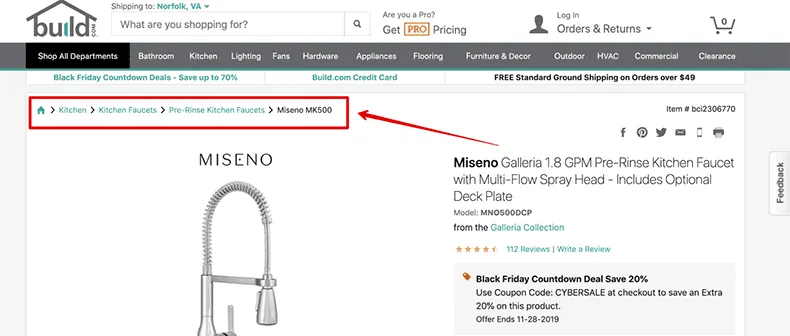
breadcrumbs

Source : SE Ranking

Customize the WP admin:

At first, you didn’t know this, but you can change the colour palette of the admin dashboard from the profile menu. Moving on, the colour schemes there probably don’t match your brand perfectly. To get full control over your admin interface, check out the WP custom admin interface plugin. You’ll have a huge amount of control over the design of your site’s admin interface. For e.g., you can create a new colour palette that can be selected from your profile menu. If you’re looking to control the admin interface, this is the way you can do it.

Add an author box:
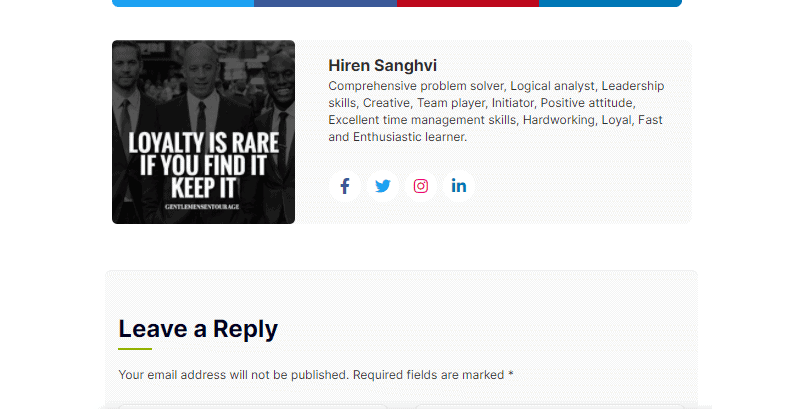
Adding an author box means something like this-
Profile
Author boxes are great for building brand awareness for two reasons. First, they get your name and face in front of visitors. Second, you can add a short bio that helps you add even more personality and relatability. Additionally, you can link to any pages you want. Since the author box shows up after the post content, visitors seeing it have just finished reading a post, which is a great time to associate yourself with that content. There are quite a few author box plugins available, but that one gives the best balance of flexibility and out-of-box quality, in my opinion.

Control which pages widgets display on:
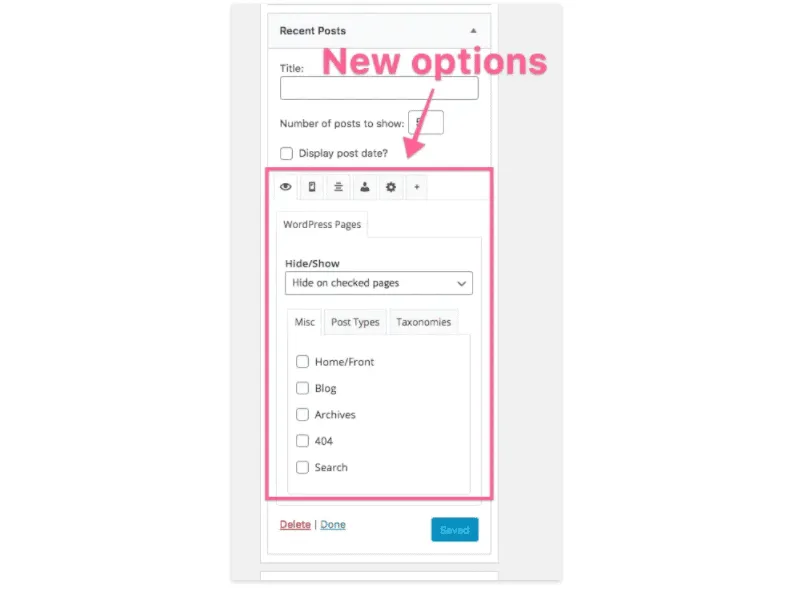
Widgets are awesome, but sometimes you want to add a widget to your sidebar, but don’t want it to display on every page of your website. After you install widget options, you’ll see this new section added to every widget.
Control
You can add widgets to entire page types at once, like all categories, or choose specific categories or even individual pages. Furthermore, you can easily flip the rules between including vs. excluding the widget on the selected pages; this plugin gives your site incredible flexibility.

Customize the footer text:

WordPress themes include a short design credit at the bottom of the site. While removing this text without writing code is often impossible, some themes like Ignite include a simple option in the customizer to change the footer text. You can include any text you want, buy many websites, and opt to include the company name, the current year, and a copyright icon. You can use your emojis to add a copyright symbol, or just copy this one to your clipboard.

Conclusion:

This blog has covered everything you need to know to customize the look and feel of your WordPress site. Using the customizer, theme options, menus, and widgets, and page builders are incredibly powerful tools and will be sufficient for a lot of people. These options are a key part of WordPress strength- there’s something for everyone, and, of course, if you don’t want to do the work yourself, you can hire somebody to do it for you. This post has been getting too long as we have added additional ways to customize a WordPress website.

FAQs

How do I change the appearance of my WordPress website?

To change the appearance of your WordPress website, you can use a theme. Themes control your site’s overall design and layout, including the colors, fonts, and styles of your content. You can find and install new themes by going to the “Appearance” section of your WordPress dashboard and clicking on the “Themes” submenu. From there, you can browse through the available themes and preview them on your site before activating the one you want to use.

How do I add new features or functionality to my WordPress website?

You can use plugins to add new features or functionality to your WordPress website. Plugins are small software that adds specific features or functionality to your site. Thousands of plugins are available, ranging from contact form builders and SEO tools to e-commerce and social media integrations. You can find and install new plugins by going to the “Plugins” section of your WordPress dashboard and clicking on the “Add New” button. From there, you can search for and install the plugin you want to use.

How do I customize the layout of my WordPress website?

To customize the layout of your WordPress website, you can use widgets. Widgets are small blocks of content that you can add to various areas of your site, such as the sidebar, footer, or header. You can find and add new widgets by going to your WordPress dashboard’s “Appearance” section and clicking on the “Widgets” submenu. From there, you can drag and drop widgets into the desired location on your site.

How do I create custom pages or post types on my WordPress website?

You can use a plugin such as Custom Post Type UI or Advanced Custom Fields to create custom pages or post types on your WordPress website. These plugins allow you to create custom post types, such as events, products, or portfolios and add custom fields to store additional information. You can then use these custom post types to create custom pages or sections on your site.

How do I edit the code of my WordPress website?

To edit the code of your WordPress website, you can use a code editor or FTP client. A code editor is a software application that allows you to view and edit the source code of your site. An FTP client is a software application that allows you to upload and download files to and from your website. You can access the code of your WordPress site by connecting to your site via FTP and navigating to the relevant files or by going to the “Appearance” section of your WordPress dashboard and clicking on the “Editor” submenu. Be careful when editing your site’s code, as a mistake could cause your site to break or malfunction.

Get in Touch
Picture of Poonam Darji

Poonam Darji

Poonam Darji is a seasoned technology professional with 4 years of experience, specializing in WordPress, Shopify, Full Stack, React JS, and Node JS development. With her expertise in these areas, she has successfully delivered exceptional web applications and e-commerce solutions. Poonam's proficiency and deep understanding of these technologies make her a reliable expert to bring your ideas to fruition.

Our Blogs

All Posts
Future of AI Environmental Services 

The Future of AI in Environmental Services: What to Expect by 2030

June 2, 2025
Future of the Automotive Industry in 2025

How AI Is Driving the Future of the Automotive Industry in 2025

May 26, 2025
AI in Water Management

AI in Water Management: Efficiency, Accuracy, and Sustainability

May 19, 2025
Take A Step Towards
Your Dream Business
Contact No :

+1-858-275-3535,
+1-214-600-2592

Email Address :
hello@reference.syndelltech.com
Teams :
hiren.k.sanghvi
Let's Make Your Project Happen
Google logo

4.9

Rating Stars
Clutch Logo

5.0

5.0 Rating Star
GoodFirms Logo

5.0

5.0 Rating Star
Follow us
Let's Discuss Your Business!
Book a Call
Hire Developers
Dedicated Developers
  • Hire Full Stack Developers
  • Hire Data Scientists
  • Hire AI ML Developers
  • Hire ChatGPT Developers
  • Hire OpenAI Developers
  • Hire RPA Developers
  • Hire Shopify Developers
  • Hire Neural Networks Developer
  • Hire UiPath Developers
  • Hire Full Stack Developers
  • Hire Data Scientists
  • Hire AI ML Developers
  • Hire ChatGPT Developers
  • Hire OpenAI Developers
  • Hire RPA Developers
  • Hire Shopify Developers
  • Hire Neural Networks Developer
  • Hire UiPath Developers
Services
  • MVP Development
  • Web Development
  • Mobile Development
  • Startup Solutions
  • SaaS App Development
  • Full Stack Development
  • AI ML Development
  • WordPress Development
  • SEO Services
  • MVP Development
  • Web Development
  • Mobile Development
  • Startup Solutions
  • SaaS App Development
  • Full Stack Development
  • AI ML Development
  • WordPress Development
  • SEO Services
Industries
  • Business
  • Real Estate
  • Travel
  • Sports
  • Fintech
  • Ecommerce
  • Healthcare
  • Education
  • Restaurant
  • Business
  • Real Estate
  • Travel
  • Sports
  • Fintech
  • Ecommerce
  • Healthcare
  • Education
  • Restaurant
Portfolio
  • Fantasy Sports App
  • Clothing Web App
  • Fleet Management Software
  • Bar Interior Design Web App
  • Property Management Software
  • Entertainment Web App
  • Language Learning App
  • Educational Web Application
  • Textile Manufacturing Web App
  • Fantasy Sports App
  • Clothing Web App
  • Fleet Management Software
  • Bar Interior Design Web App
  • Property Management Software
  • Entertainment Web App
  • Language Learning App
  • Educational Web Application
  • Textile Manufacturing Web App
Quick Links
  • Industries
  • Areas We Serve
  • Case Studies
  • Client Testimonials
  • Contact Us
  • Get An Estimate
  • Blog
  • Careers
  • Industries
  • Areas We Serve
  • Case Studies
  • Client Testimonials
  • Contact Us
  • Get An Estimate
  • Blog
  • Careers
Syndell

A Full Stack App Development Agency.

Certified USA
ISO Certified
US - United States
  • USA

600 North Broad Street, Suite 5 #3424, Middletown, DE – 19709

IN - India
  • INDIA

304 Shikhar Complex, Srimali Society, Navrangpura, Ahmedabad – 380009

United Kingdom
  • UK

Bloc, 17 Marble St, Manchester, M2 3AW, United Kingdom

©Syndell 2014-2026. All rights reserved.
DMCA.com Protection Status
Protected by Copyscape
Terms of Use | Privacy Policy | Sitemap